10 Replies
3309 Views
0 Likes
7 Participants
Last post by clouddancer 5 Jan 2012 12:31

littlewolf
Forum God
posted 28 Dec 2011 06:59
Can anyone Assist me?.
I want to put 2 or more of my scanned drawing into Paint so I can play with the colours.
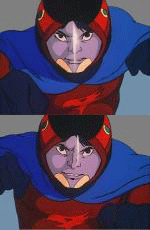
At this stage I have mastered putting one in but can't seem to figure out putting 2 in side by side eg Katse drawing to make a full face.
Can anyone assist?
Also to make the collage I save my drawing in a word doc (silly me) and PDF to get all the drawing together, now I want to do some playing with then and save them in one pictures or jpec ( they are all saved individually as jpec)
Is there a way to save them all on 1 or 2 pages without having to put them in a word doc???
I want to put them on deviant art but not individually.
Thank you so much (signed computer challenged LW)

You can't change a word document into a picture - you would need to re-make the collage using the saved pictures and a graphics program (such as photoshop).
Once you put the pictures into a word document, you have embedded them into that and, though in Office 2010, you can then do some incredible things with them, you can't change the actual document.
That said - I think that Landa has taken a picture and changed it in Word 2010 and then managed to resave the picture??? Landa???? (but not changed the word document to a picture).
I can't help you much with Paint -that's a program that I've never used.
I know that I could use Photoshop to put all your pics into one jpeg without having them be in a Word doc. First, I'd create a "new" image in Photoshop, making sure its pixel-by-pixel size is large enough to contain all the individual pics. Then, I'd individually copy and paste all the jpeg images onto the large new image. Then, they could be moved around anyway one saw fit (and played with individually too, as each one would be on its own separate "layer"), and ultimately the whole thing could be saved as one jpeg image.
If Paint is anything akin to Photoshop, you might be able to do something like this.
If you can't, I could do it for you in Photoshop.

When you sent me the pdf of one of your collages, I was able to load it in Gimp and save it as a new image, like LB suggested with photoshop.
If you can't do it from the Word doc, convert the doc to pdf and then try.

Nope - Paint just doesn't have the right set of tools to permit merging multiple pictures. It will allow you to manipulate sections of one picture - by cut and paste.
Big hairy hammer method (assuming you are working in Windows)-
1) Open your Word file
2) Maximize the window
3) Position and size your Word document so that the pictures are visible on the screen
4) Use the [Alt-PrntScrn] key combination to capture a bitmap of your Word window to temporary storage (this works to capture just the active program window - rather than the full screen)
5) Open Paint
6) Paste (Cntl-V) the captured picture to Paint
7) Manipulate the single image as you desire
 Save the resulting picture from Paint
Alternatively -
If you want - send the file to me with the pictures in it, and I can put them together (Photoshop or Gimp... I've got both).
Save the resulting picture from Paint
Alternatively -
If you want - send the file to me with the pictures in it, and I can put them together (Photoshop or Gimp... I've got both).
littlewolf
Forum God
posted 29 Dec 2011 01:42
Thanks all.
Looks like I put learning photoshop at the top of my list for 2012 and after seeing all the amazing pictures that get posted here and on Devian , I want to see what I can produce and do with some of my old drawings
Just a thought -
Gimp is Open Source (no cost) and does everything you might want to learn for the first year or more - Beats US$$$ for Photoshop CS5 - even the academic version is more than US$100.  That way you can experiment, learn, and basically get up to speed while saving for the Adobe package.
I have GIMP and sort of like it.
It is easy to use, and I'd probably use it and play more if I were more artisticly inclined.
My problem is I do get frustrated easily when I can't get what I see in my mind to come up on the paper or the screen. A more expensive program won't help that.
Good luck to you in the next year, LW. Look forward to seeing more of you work.

If you cannot get on with Gimp try Paint.Net its a free graphics editor and its pretty good.
littlewolf
Forum God
posted 30 Dec 2011 03:47
Thank you all!
My nephew is going to lend me his tablet thingie which has a pen like attachement, so I can scan and sketch, (don't know what its called ) he tried teaching me by useing the mouse but I can't seem to get the feel of it that way.
I'l talk to him about GIMP, paint and photoshop and see what I can produce.
Once again thanks all.
clouddancer
Gatchamaniac
posted 5 Jan 2012 12:31
I hope you are successful LW. I look forward to seeing what you manage to produce with the new knowledge you pick up.
I have wondered about learning Photoshop this year, but since I am not much of an artist I am not sure how much I will be able to fully utilize the program.
Please login to post replies.